Overview

Once you create and published your first plan, you are ready to subscribe customers to it. Here is when the beauty of Unprice comes in. Because plans are inmutable, every customer you subscribe never will have some side effect when there are new versions of the same plan. Customer subscribes to a specific plan versions, which is way you can iterate on the prices without affecting current customers. You can grandfather customer from one version to another, or change the plan entirely as well. There are 2 main ways to create customer in Unprice. The recommended way is through our API or SDK. You can also use the Dashboard.
Create API key for your project in Unprice
A plan represent the package of features that you are offering. Every plan can have multiple versions, which comes handy when you want iterate on it. More info here
npm install @unprice/api
SignUp method can be use to get the latest version of a plan and subscribe to it, or you can pass a specific plan version ID. More info here
// subscribe to the lastest version of the plan PRO
const { result, error } = await unprice.customers.signUp({
  name: "John Doe",
  email: "[email protected]",
  planSlug: "PRO",
  externalId: "your_database_id",
  successUrl: "https://example.com/dashboard",
  cancelUrl: "https://example.com/login"
});

if (error) {
  // handle potential network or bad request error
  // a link to our docs will be in the `error.docs` field
  console.error(error.message);
  return;
}

console.log(result);
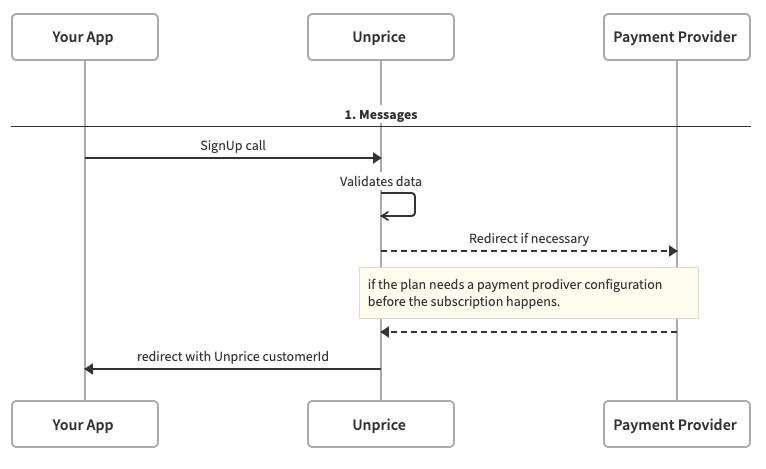
This is the flow of how it works.
The signUp flow if sucessful will response with the redirect URL and the customer ID.

How to create customers - Tutorial

Next Steps

You should get to know our API reference or the Typescript SDK to start integrate with your product. You can also check out the Features section for more information on how to use Unprice.