> ## Documentation Index
> Fetch the complete documentation index at: https://docs.unprice.dev/llms.txt
> Use this file to discover all available pages before exploring further.
# First customer
> Subscribe one customer to a published plan version.
Create or map one customer before you enforce a paid action. The customer is the economic actor in
Unprice: subscriptions, entitlements, budgets, wallets, usage, and invoices are tied to this ID.
## When to use `customers.signUp`
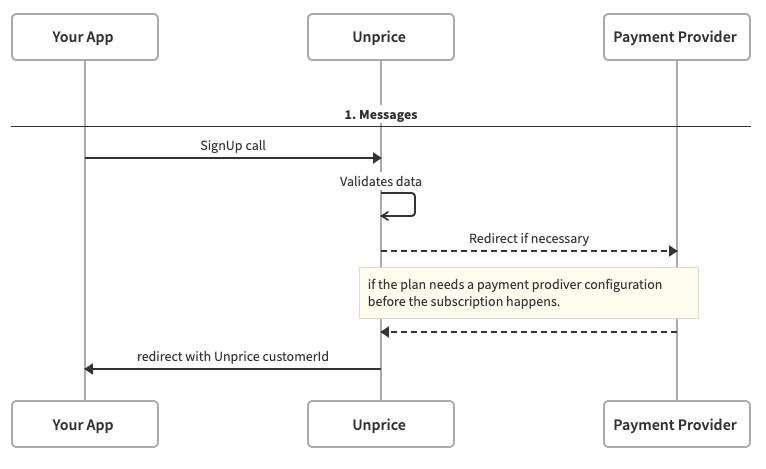
Use `customers.signUp` when Unprice should provision the customer money path from a plan version:
* customer record
* subscription and active phase
* entitlements from the published plan version
* billing periods
* wallet and initial credit policy when configured
* checkout redirect when the plan needs payment-provider setup
## Install the SDK
```bash npm theme={null}
npm install @unprice/api
```
```bash pnpm theme={null}
pnpm add @unprice/api
```
```ts theme={null}
import { Unprice } from "@unprice/api";
const unprice = new Unprice({
token: process.env.UNPRICE_TOKEN
});
```
## Sign up the customer
```ts theme={null}
const { result, error } = await unprice.customers.signUp({
name: "Acme Inc.",
email: "buyer@example.com",
planSlug: "pro",
externalId: "acct_123",
successUrl: "https://yourapp.com/billing/success",
cancelUrl: "https://yourapp.com/billing/cancel"
});
if (error) {
throw new Error(error.message);
}
await db.accounts.update({
where: { id: "acct_123" },
data: {
unpriceCustomerId: result.customerId
}
});
```
Use `planSlug` to sign up for the latest published version of a plan, or `planVersionId` to pin the
customer to a specific published version.
 ## After signup
Use the returned `customerId` in runtime calls:
```ts theme={null}
const { result, error } = await unprice.access.check({
customerId: account.unpriceCustomerId,
featureSlug: "ai-generations"
});
```
## Next steps
Put the first paid action on the money path.
See the full `customers.signUp` request and response shape.
## After signup
Use the returned `customerId` in runtime calls:
```ts theme={null}
const { result, error } = await unprice.access.check({
customerId: account.unpriceCustomerId,
featureSlug: "ai-generations"
});
```
## Next steps
Put the first paid action on the money path.
See the full `customers.signUp` request and response shape.